Google just updated its AI Edge Gallery app with three new capabilities: MCP support, local notification reminders, and persistent chat history. The notification and session features are solid quality-of-life improvements. But the MCP integration is the one worth looking at closely.
This piece tries to answer three major questions: what is Google AI Edge Gallery, why does it need MCP support, and what do the new capabilities mean if you are already building with MCP?
What Is Google AI Edge Gallery and How Does It Use On-Device AI
Google AI Edge Gallery is an on-device AI showcase app for Android and iOS. It lets users and developers run open models (primarily Gemma) directly on their phones, without sending requests to a cloud inference endpoint. Last month Google added agentic workflow support using Gemma 4. This update extends that.
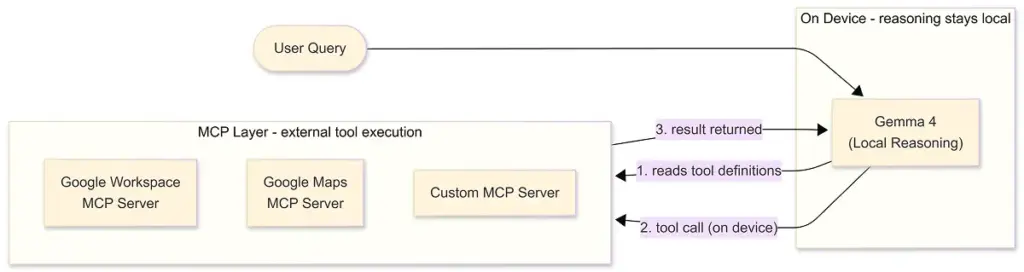
The key detail: the model runs on your device. Reasoning happens locally. That constraint is what makes the MCP integration worth unpacking.
Why Google AI Edge Gallery Chose MCP for On-Device Tool Calling
On-device models face a real tradeoff. Keeping computation local is good for privacy and latency. But it also means the model is isolated: it cannot reach your calendar, query a website, or check your inbox without some structured bridge to the outside world.
The old answer to this was custom integrations. Build a specific connector for each data source, ship it with the app, maintain it when APIs change. That works for a fixed set of use cases. It does not hold up when the goal is letting developers build arbitrary workflows on top of it.
MCP approaches this differently. Instead of pre-building every possible integration, it defines a standard for how a model discovers and calls external tools. The app registers an MCP server URL. The model reads the tool definitions from that server. When a user asks something that requires a tool, Gemma 4 decides which one to call and generates the request, on device. The MCP server handles execution and returns a result.
The model’s reasoning stays local. Its reach extends as far as the MCP servers it connects to.
Why Google Built on the Open MCP Standard Instead of a Custom Protocol
Google could have built a proprietary protocol for this. They did not. They used the existing open MCP standard, specifically the Streamable HTTP transport from the November 2025 MCP spec.
That choice matters. MCP has been adopted across the industry: Claude, Microsoft Copilot, Cursor, and a growing list of enterprise tooling. When Google builds on the same standard rather than replacing it, it extends the surface area of the existing ecosystem. A server a developer builds today to expose Google Workspace data, Maps functionality, or a custom internal tool can potentially work across multiple MCP-compatible clients, not just this app.
A bespoke Google protocol would have required developers to maintain separate integrations per platform. That is the problem MCP exists to avoid.
There is also something worth noting about what this signals. Google chose an open standard for a mobile agentic use case: which is architecturally messier and more constrained than a desktop or server environment. That suggests they see MCP as durable infrastructure, not just a convenient shortcut for this release.
What Google’s MCP Integration Means for Devs Building MCP Servers
Several things change when MCP runs on mobile devices with on-device models.
Context windows get smaller: Gemma 4 on a phone operates under tighter constraints than a large server-side model. Tool descriptions that work fine in a desktop agent may be too verbose here. Google’s own documentation recommends keeping tool descriptions short and returning small data payloads rather than large blobs. If you are building MCP servers with broad compatibility in mind, it is worth designing for this now rather than retrofitting later.
The client surface is growing: Until recently, MCP clients were mostly desktop apps and developer tools: Claude Desktop, Cursor, a handful of IDE integrations. Google AI Edge Gallery adds a mobile client to that list. More importantly, it is a working reference for how MCP can operate in a constrained, on-device environment. Other mobile apps will follow this pattern.
Tool design gets more important: Smaller models have less room to reason through ambiguous input. A tool that relies on the model inferring complex intent will fail more often here than it would with a larger model. Well-scoped tools with clear descriptions and tight input schemas are good practice in any context: on mobile they are closer to a requirement.
The ecosystem is starting to converge around real data sources. Google Workspace MCP, Google Maps MCP, and web fetch MCP are already demonstrated as working integrations in this release. These are not toy examples. They are production data sources developers can now expose to a mobile agent through a protocol they already know. That reduces a meaningful amount of integration work.
Why Mobile Changes the MCP Design Conversation
Desktop agent environments gave MCP room to be forgiving. Large context windows and powerful hosted models could compensate for bloated tool descriptions, ambiguous schemas, and inefficient payloads. Mobile changes that equation quickly.
On-device models operate under tighter memory, latency, and reasoning constraints. That pushes MCP server design toward something more disciplined: smaller payloads, clearer tool boundaries, tighter schemas, and more deterministic workflows. In practice, that is probably healthy for the ecosystem overall.
The more important shift is strategic. Until now, MCP adoption was concentrated in developer tooling and desktop copilots. Google bringing MCP into a mobile, on-device environment expands the protocol into a very different runtime model. The constraints are harsher, the devices are ubiquitous, and the expectation of privacy is much higher.
If MCP works well there, it becomes harder to argue that it is just a desktop-agent standard or a temporary developer trend. It starts looking more like foundational infrastructure for how AI systems access external tools across environments.
Google AI Edge Gallery is available on Android now, with iOS MCP support coming soon. Technical documentation and example configurations are on the Google AI Edge GitHub repository.